
Measure land area on your phone in hectares, alqueires and m²
Tap the corners of the land on the map or walk the boundary with GPS: NovexGO shows the area in hectares, square meters and alqueires, plus the perimeter.
I want the app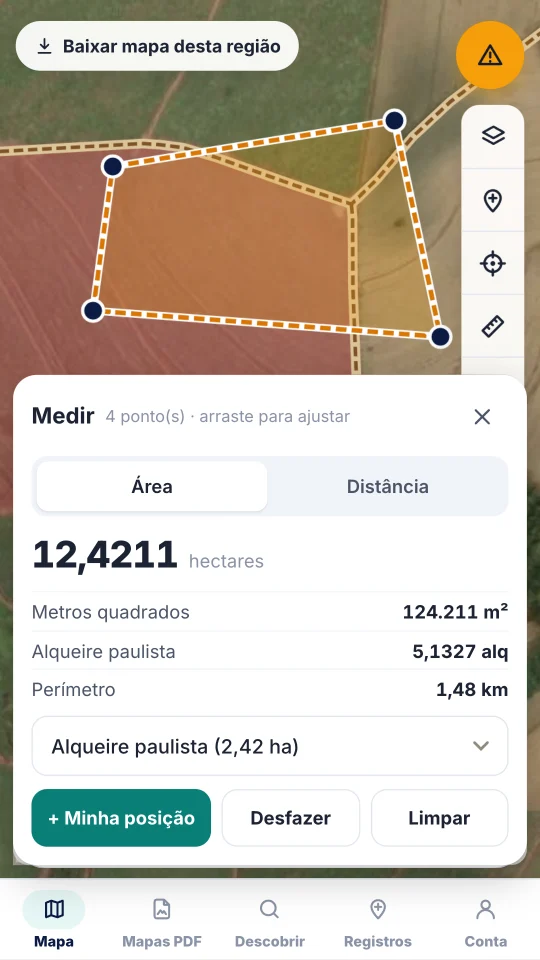
How to measure
- 1
Open Measure
On the map, tap the ruler and choose Area (or Distance).
- 2
Mark the corners
Tap the corners on the map or use “My position” to mark where you are while walking the boundary.
- 3
Adjust
Drag any point to correct it. The area updates instantly.
- 4
Use the result
Choose your region's alqueire and take the area to the map sheet area table on the website.
Units
- Hectares and square meters
- Alqueire paulista (2.42 ha), mineiro/goiano (4.84 ha), baiano (9.68 ha) and northern
- Perimeter in km
- Straight-line or road distance
- Works on street, satellite or hybrid maps
- Also on the website, in the Measure tab
FAQ
Which alqueire does the app use?
You choose: paulista (2.42 ha), mineiro/goiano (4.84 ha), baiano (9.68 ha) and others. Hectares and m² are always shown.
Does it work offline?
Yes, on a downloaded map with your phone's GPS. Satellite imagery needs internet.
How accurate is it?
The calculation uses the ellipsoid (like GIS software). Accuracy depends on where points are marked and on the device GPS.